Samsung Smart TV Voice Remote Control – Solar & USB-C Rechargeable Replacement
Never replace a battery again. This Samsung Smart TV voice remote is a premium replacement for 2019–2024 Samsung smart televisions, offering two convenient charging methods — solar power and USB-C — along with built-in voice control, 4 app shortcut buttons, and reliable Bluetooth connectivity up to 40 feet away.
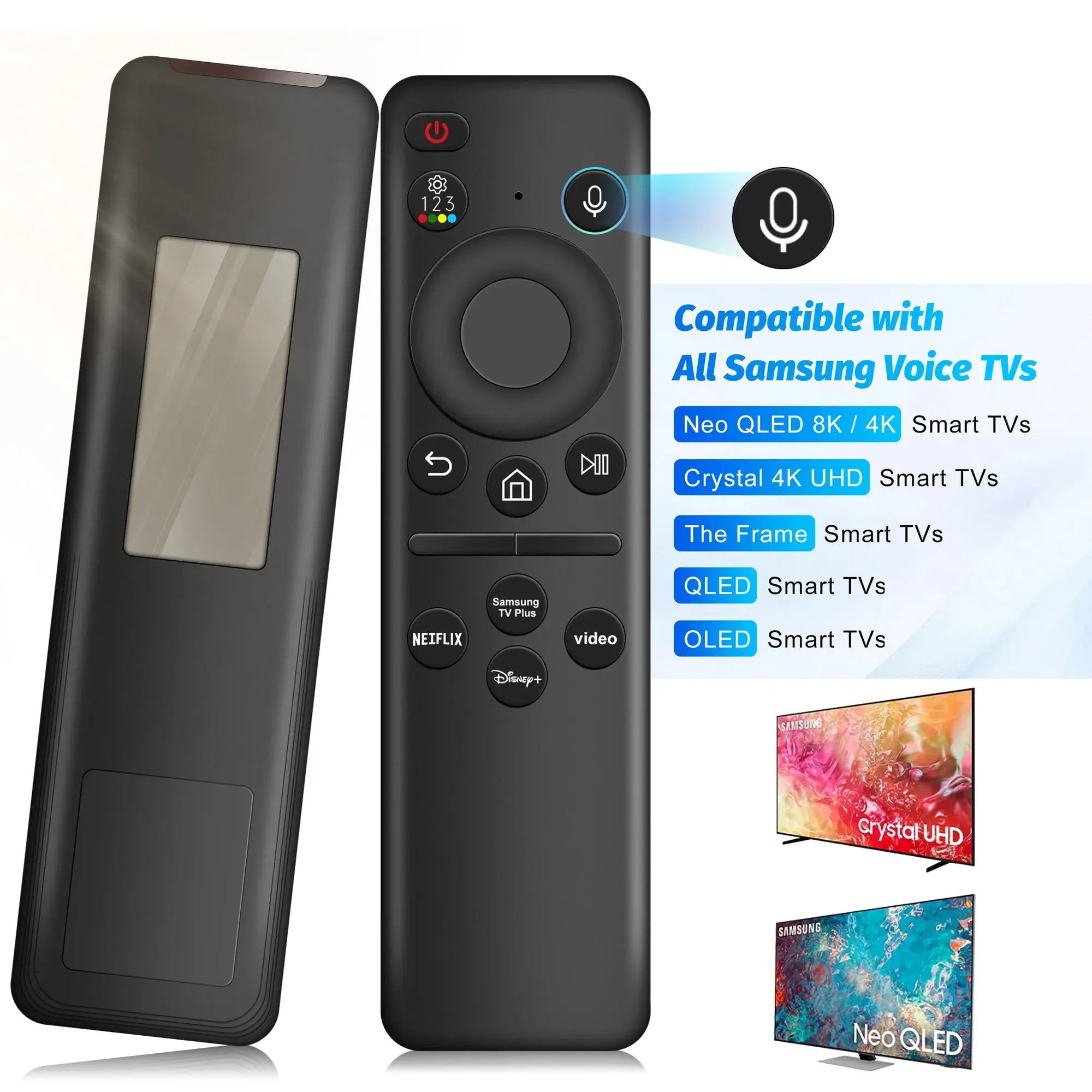
Compatible with Samsung Frame, Crystal 4K UHD, Neo QLED 4K/8K, OLED, and QLED Smart TVs, this remote is the ideal like-for-like replacement for your original Samsung remote.
Key Features
-
Dual Charging Methods – Recharge via solar panel or USB-C; eco-friendly and always ready
-
Built-in Voice Control – Ask your TV to find content, change channels, or adjust settings hands-free
-
4 App Shortcut Buttons – One-press access to your favourite streaming apps
-
Bluetooth Connectivity – Accurate, responsive control from up to 40 feet (approx. 12 metres)
-
Wide Samsung Compatibility – Supports 2019–2024 Samsung smart TV models with voice capability
-
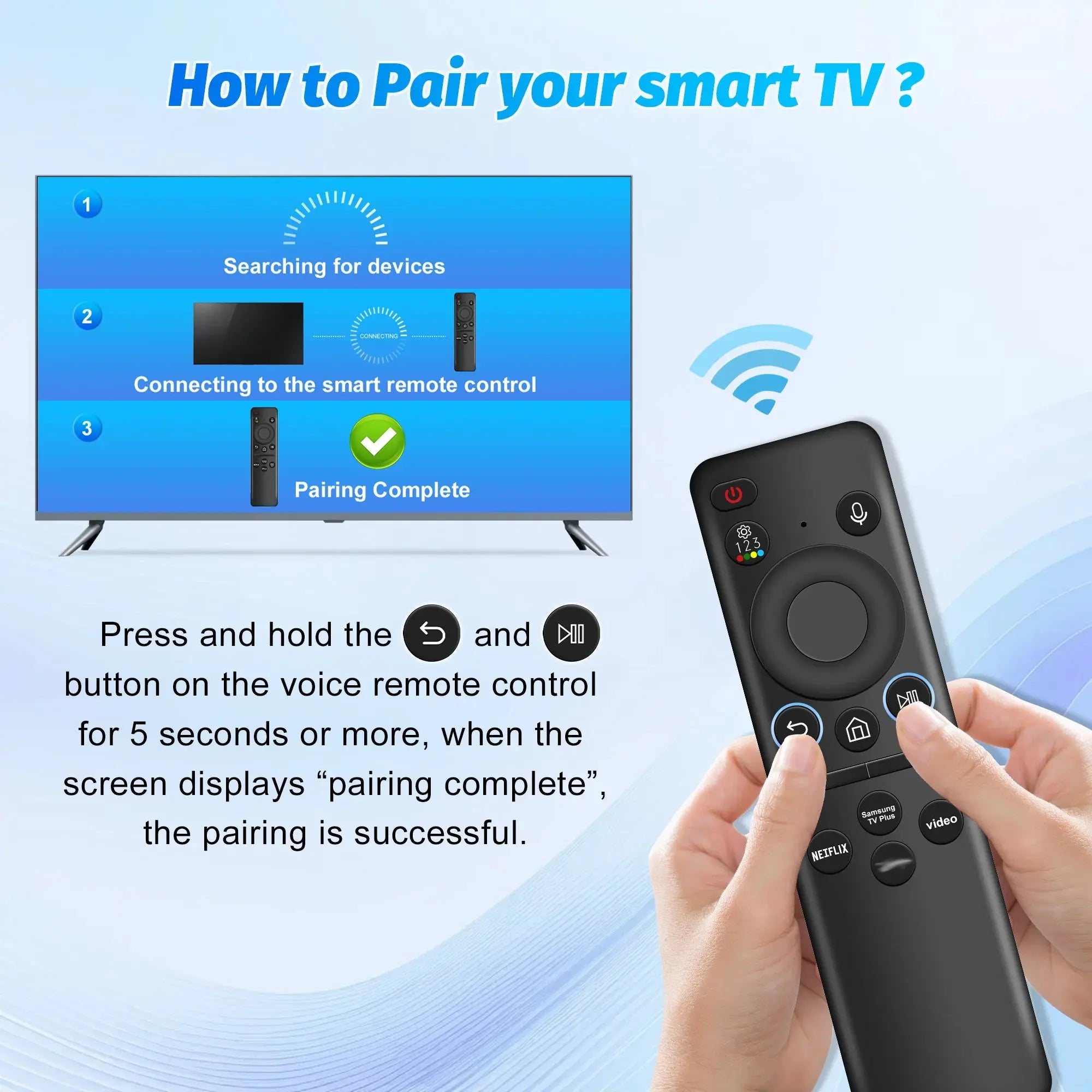
Simple Pairing Process – Pairs quickly using the Back/Exit and Play/Pause button combination
-
Lightweight Design – Weighing just 65g for comfortable, everyday use
Specifications
-
Wireless Communication: Bluetooth
-
Charging Methods: Solar & USB-C (Type-C)
-
Charging Requirement: 5V/2A charger only
-
Voice Control: Yes (requires Samsung TV with voice capability)
-
App Shortcut Buttons: 4
-
Bluetooth Range: Up to 40 feet (~12 metres)
-
Weight: 65g
-
High-Concern Chemicals: None
-
Use: Samsung Smart TV
-
Variants: Type-C Remote, Solar Remote Control
Compatibility
This remote is compatible with Samsung Smart TVs from 2019 to 2024 that support voice control, including:
- Samsung Frame TV
- Samsung Crystal 4K UHD
- Samsung Neo QLED 4K & 8K
- Samsung OLED
- Samsung QLED Smart TVs
Compatible remote model numbers include:
BN59-01385A/B, BN59-01432A, BN59-01455A, BN59-01357A/F, BN59-01312A, BN59-01312D, BN59-01312E, BN59-01312F, BN59-01312G, BN59-01312K, BN59-01312L, BN59-01312M, BN59-01312Q, BN59-01312T, BN59-01312U, BN59-01312X, BN59-01329A, BN59-01329C, BN59-01329F, BN59-01330A, BN59-01330C, BN59-01330H, BN59-01330M, BN59-01330N, BN59-01330Q, BN59-01357F, BN59-01385B, and more.
Note: Voice control requires your Samsung TV to have built-in voice capability. If your TV does not support voice control, this feature will not function.
How to Pair Your Remote
- Ensure the remote is fully charged before first use.
- Press and hold the Back/Exit and Play/Pause buttons simultaneously for 5–7 seconds.
- Wait until "Pairing complete" appears on your TV screen.
- If pairing fails, repeat the process or refer to the included user manual.
Important Charging Notes
-
Charge before first use – The remote must be charged prior to initial setup.
-
Use a 5V/2A charger only – Other chargers may not charge the remote correctly.
-
Solar variant: USB-C charging cable is not included with the Solar Remote Control variant.
Frequently Asked Questions
Is this remote compatible with my Samsung TV?
This remote is designed for Samsung Smart TVs from 2019 to 2024 that support voice control, including Frame, Crystal 4K UHD, Neo QLED 4K/8K, OLED, and QLED models. Check the compatible model numbers listed above to confirm your TV is supported.
What is the difference between the Type-C and Solar variants?
Both variants offer the same features and compatibility. The Type-C Remote charges exclusively via USB-C cable (included). The Solar Remote Control charges via its built-in solar panel and also supports USB-C charging — however, the charging cable is not included with the solar variant.
Does voice control work on all Samsung TVs?
No. Voice control requires your Samsung TV to have built-in voice capability. If your TV does not support voice control natively, the voice function on this remote will not work. All other remote functions will still operate normally.
How do I pair the remote to my Samsung TV?
Make sure the remote is fully charged, then press and hold the Back/Exit and Play/Pause buttons together for 5–7 seconds until "Pairing complete" appears on your TV screen. If it doesn't pair, repeat the process or consult the included manual.
What charger do I need?
You must use a 5V/2A charger to charge this remote. Other chargers may not provide sufficient power and could fail to charge the device.
How far away can I use the remote?
The Bluetooth connection supports a range of up to 40 feet (approximately 12 metres), giving you reliable control from across the room.
Does this remote help replace disposable batteries?
Yes. With solar and USB-C rechargeable power, this remote helps reduce the need for disposable batteries while keeping your Samsung Smart TV ready to use.